



.webp)










GDPR compliance software like Geo Consent, OneTrust, Iubenda, TrustArc and Cookiebot helps automate execution, not legal judgment. Compliance breaks down when teams rely on tools alone instead of aligning legal decisions with how consent and data handling are enforced on the site.
Key takeaways:
- What GDPR compliance software actually handles vs. legal oversight
- Which tools matter most for websites and marketing stacks
- How to combine tools without overengineering compliance
If your website gets EU traffic, GDPR compliance comes with it. The problem is execution. Consent banners, tracking scripts, forms, and third-party tools change constantly, and manual checks do not scale.
GDPR compliance software helps you manage the operational side: collecting and storing consent, controlling what runs before consent, handling access and deletion requests, and keeping records you can actually produce when needed.
Below, we focus on how GDPR compliance software works in practice for websites and marketing teams, which types of tools cover which parts of the problem, and how to compare options.
What is GDPR compliance software?
GDPR compliance software is a set of tools that helps you run GDPR requirements in day-to-day operations.
Instead of relying on policies and manual checks, it gives you workflows and controls that apply your privacy rules across your website, systems, and teams.
Most GDPR compliance software supports four areas:
- Consent management: Capturing consent choices and keeping an accurate log.
- Data subject rights: Processing access, deletion, and portability requests within deadlines.
- Data visibility: Understanding where personal data lives and how it flows between tools.
- Compliance reporting: Maintaining logs and documentation that show what was done and when.
Tip: New to EU privacy? Check out our guide to GDPR & cookie consent to get all the facts you need to stay compliant.
What GDPR compliance software needs to cover
GDPR compliance software needs to support how personal data is actually handled across a website and its connected tools.
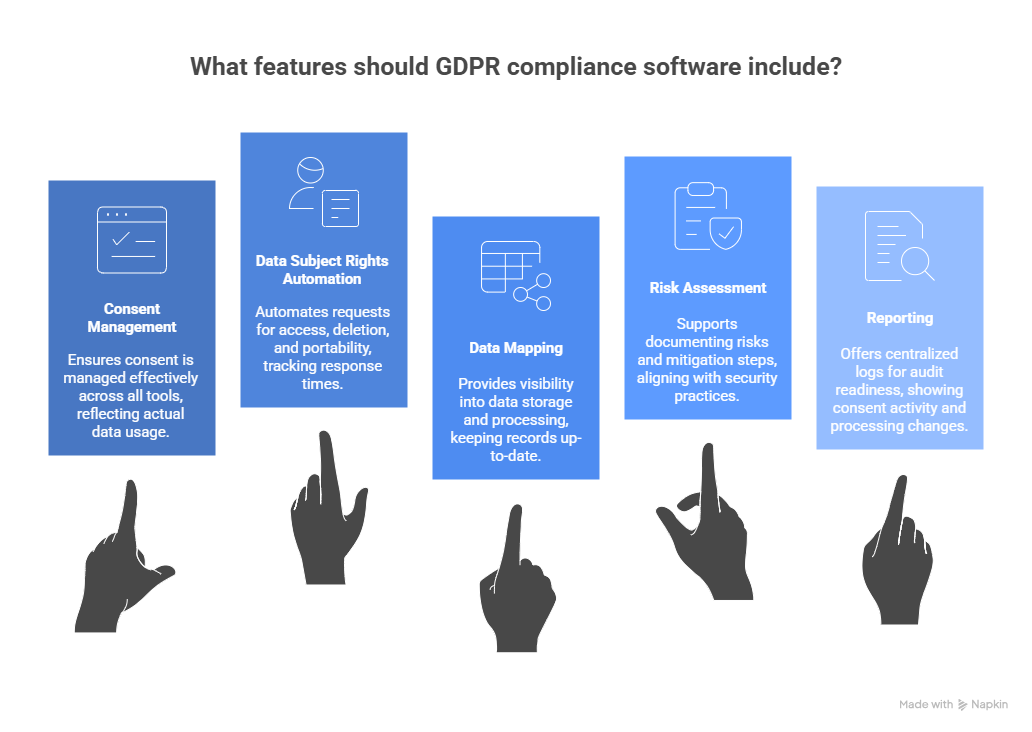
At a minimum, effective GDPR compliance software needs to cover the following areas.
Consent and cookie management
Consent management is the most visible part of GDPR compliance and one of the easiest places to get wrong. Software needs to do more than display a banner, it has to apply consent decisions consistently across tracking, analytics, and third-party scripts.
In practice, that means:
- Managing consent banners in a way that reflects how data is actually used.
- Recording and storing consent decisions with clear timestamps.
- Enforcing opt-in and opt-out logic at a technical level, not just in policy text.
Data subject rights automation
GDPR gives individuals the right to access, delete, or transfer their personal data. As soon as data exists in multiple tools, handling these requests manually becomes risky.
Compliance software should support access, deletion, and portability requests while tracking response timelines so deadlines are not missed. Even if the underlying data lives elsewhere, the request workflow and audit trail need to be centralized.
Data mapping and records of processing
GDPR requires organizations to understand where personal data is stored and how it is processed. Article 30 formalizes this requirement, but the operational value is broader.
Software should provide visibility into where personal data lives, which systems process it, and for what purpose. Without that visibility, records of processing fall out of date as the stack changes.
Risk assessment and security alignment
Some data processing activities require formal risk assessments, such as DPIAs, especially when introducing new features or handling sensitive data.
GDPR compliance software should support documenting risks and mitigation steps, and align with existing security practices.
It should not replace security tooling, but it should connect privacy decisions to real data handling activity rather than static documents.
Reporting and audit readiness
Compliance only holds if it can be demonstrated. When regulators, partners, or internal teams ask for proof, you need records that are accurate and accessible.
Software should provide centralized logs showing consent activity, data subject requests, and processing changes, with clear timestamps and ownership. You don’t need constant reporting, you need evidence you can produce quickly when it matters.
Types of GDPR compliance software
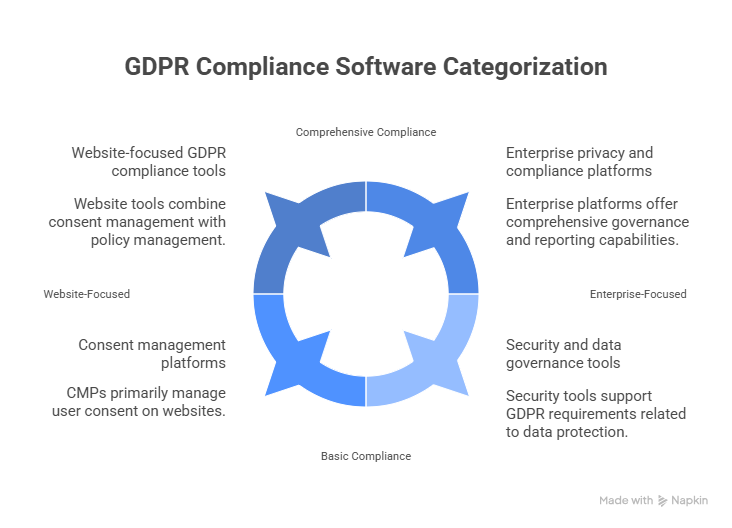
GDPR compliance software falls into a few clear categories, each designed to handle a different part of the compliance workload. Most businesses don’t rely on a single tool. Instead, they combine software based on where data is collected, how it is used, and how complex their setup is.
Here are the main types of software to consider when shopping around.
Consent management platforms
Consent management platforms focus on collecting, storing, and enforcing user consent on websites. Their primary role is managing cookies, tracking technologies, and consent signals passed to analytics or advertising tools.
These platforms typically handle consent banners, record consent decisions with timestamps, and prevent non-essential scripts from running before consent is given.
They’re usually the first GDPR tool a website is equipped with because consent is the most visible and easiest area to audit.
On their own, CMPs usually stop at consent. They don’t manage broader data rights workflows or internal data governance.
Website-focused GDPR compliance tools
Website-focused tools expand beyond consent banners and address GDPR requirements directly at the site level. They often combine consent management with cookie scanning, policy management, and basic support for user data requests.
These tools are designed for teams that need practical, site-level compliance without heavy legal or engineering involvement.
Their main limitation is scope. Once personal data flows deeply into backend systems, these tools may not be enough on their own.
Enterprise privacy and compliance platforms
Enterprise platforms are built for organizations with complex data environments and formal privacy programs. They focus on managing data subject requests, maintaining records of processing, handling vendor risk, and producing audit documentation across the organization.
These tools are less concerned with website experience and more focused on governance, workflows, and reporting. They usually require significant setup and coordination across teams but provide visibility that smaller tools cannot.
In many cases, enterprise platforms sit alongside website-level tools rather than replacing them.
Security and data governance tools
Security and data governance tools aren’t always labeled as GDPR software, but they play an important supporting role and help identify where personal data exists, control access, monitor activity, and detect potential breaches.
While they don’t manage consent or user requests, they support GDPR requirements related to data protection and incident response.
Most businesses don’t need a single monolithic GDPR platform. Compliance is usually achieved by combining website-focused tools with broader privacy or security systems, based on how data is actually collected and processed.
Best GDPR compliance software tools for 2026
If you're handling cookie consent, managing data subject requests, or localizing privacy notices, the right software can reduce manual work and help you stay ahead of evolving regulations.
Here are five GDPR compliance tools worth considering in 2026, each catered to different business needs.
Geo Targetly: Best for website and geo-based GDPR compliance
Geo Targetly helps businesses personalize content and user experiences based on visitor location. But when it comes to GDPR, its geo-targeting capabilities also make it a practical compliance tool.
You can use Geo Targetly’s Geo Consent to:
- Display cookie consent banners only to EU visitors without forcing the same consent experience on users in other regions
- Show country-specific privacy policies without building separate websites.
- Optionally route EU users to GDPR-specific pages or experiences when needed.
- Customize data collection notices based on location, language, or currency.
Rather than acting as a full GDPR compliance platform, Geo Targetly works as a control layer for applying GDPR-related experiences on the website based on visitor location.
It lets teams decide when consent banners, privacy messaging, or region-specific content appear, without duplicating pages or maintaining separate sites for different regions.
If you’re looking for a way to apply GDPR experiences only where they’re required, Geo Targetly offers a practical, website-level approach.
OneTrust: Best for enterprise GDPR programs
OneTrust is built for large organizations managing complex privacy programs across multiple jurisdictions. It offers a full suite of tools covering consent management, data mapping, data subject access requests (DSARs), and vendor risk assessments.
Key features include:
- Automated privacy impact assessments (PIAs)
- Centralized consent records and audit trails
- Integration with CRM and marketing platforms
- AI-powered data discovery across cloud and on-prem systems
Enterprises use OneTrust to manage privacy across departments and regions, with customizable workflows and detailed reporting. It’s not lightweight, but it’s thorough.
Cookiebot: Best for cookie consent management
Cookiebot focuses on one thing and does it well: managing cookie consent in compliance with GDPR and ePrivacy Directive requirements. It scans your website, categorizes cookies, and automatically generates consent banners that adapt to the user’s location.
What makes it useful:
- Automatic cookie scanning and classification
- Geo-targeted consent banners
- Consent logs for audit readiness
- Google Tag Manager integration
For websites with frequent third-party scripts or dynamic content, Cookiebot helps maintain compliance without constant manual updates.
TrustArc: Best for privacy risk management
TrustArc offers a mature platform for managing privacy risks, especially for companies operating in regulated industries like finance or healthcare. It combines privacy assessments, data flow mapping, and compliance dashboards in one system.
Notable capabilities:
- Dynamic risk scoring for data processing activities
- Vendor risk management tools
- DSAR automation and tracking
- Regulatory intelligence updates
If your organization needs to demonstrate accountability and manage privacy across a complex data environment, TrustArc provides the structure and tools to do it.
iubenda: Best for small businesses
iubenda simplifies GDPR compliance for startups, e-commerce shops, and small teams that don’t have legal departments or privacy officers. It offers pre-built legal documents, consent solutions, and integrations with popular platforms like WordPress and Shopify.
Key features:
- Auto-updating privacy and cookie policies
- Consent management for forms and cookies
- Internal privacy documentation generator
- Multilingual support
iubenda is ideal if you want to get compliant quickly without hiring external consultants. You can generate a compliant privacy policy in minutes, then embed it on your site with a single line of code.
Choosing the right GDPR tool depends on your business size, audience location, and internal resources. These tools support different compliance needs, from simple website setups to large, multi-region organizations.
How to choose the right GDPR compliance software
GDPR compliance software should fit your workflows and your tech stack, not complicate them. The right tool makes privacy manageable as your data and teams scale. Here are some tips to help you make the right choice.
Define your compliance scope
Start by mapping out what GDPR compliance means for your business. Are you collecting emails through forms? Running personalized ad campaigns? Managing user data across multiple platforms?
The scope of your compliance needs will depend on:
- The types of personal data you collect (names, emails, IP addresses, behavioral data)
- Where your users are located (especially if you serve users in the European Union)
- How you process and store that data (internally, via third-party tools, or both)
Clarifying your scope helps narrow your options to tools that actually support your use cases.
Assess technical compatibility
GDPR software needs to work with your existing systems, not fight them. Before committing, check how the tool integrates with your:
- Website platform (WordPress, Shopify, Webflow, etc.)
- Tag managers (like Google Tag Manager)
- Marketing tools (such as CRMs, email platforms, or ad networks)
- Backend systems (for handling data access or deletion requests)
Look for software that offers both visual setup options and developer-level access. If you’re working with a global audience, check whether the platform supports geo-targeted consent.
Balance compliance and user experience
Compliance shouldn’t come at the cost of conversion rates or usability. The right software should help you meet legal requirements without overwhelming your visitors.
Here’s what to look for:
- Granular consent options: Let users choose what types of cookies or tracking they accept.
- Clear, branded interfaces: A consent banner that matches your site’s design builds trust.
- Performance impact: Some tools load slowly or block scripts inefficiently. Test how the tool affects page speed and tag firing.
Some platforms offer asynchronous loading or tag-blocking logic that keeps things smooth.
Plan for scalability
Your compliance needs will grow as your audience, data sources, and team expand. Choose a platform that can scale with you.
Consider:
- Multi-site support: If you manage multiple domains or sub-brands, can you manage consent settings centrally?
- User roles and permissions: Can different team members (e.g., legal, marketing, dev) access only what they need?
- Audit logs and reporting: As you scale, you’ll need visibility into consent records, data requests, and banner performance.
Some tools also offer automated data request workflows, and others integrate with your CRM or customer support tools to streamline those tasks..
GDPR compliance software for websites and marketing teams
Websites are the most common source of GDPR risk because they change constantly. New scripts get added, tracking tools evolve, forms multiply, and third-party services quietly collect data in the background.
It doesn’t take much for a site to drift out of compliance, especially when marketing teams move faster than manual reviews can keep up.
Generic consent banners often make this worse. A one-size-fits-all banner can be misleading, overly intrusive, or technically ineffective if it doesn’t actually control what runs before consent. In many cases, banners signal compliance without enforcing it, which creates exposure instead of reducing it.
This is where geo-aware compliance logic matters. GDPR obligations apply based on the visitor’s location, not the company’s.
Software that can adapt consent experiences and privacy messaging by region helps websites apply GDPR rules where they’re required, without forcing the same experience on every visitor.
For marketing teams, this makes compliance more practical to manage alongside performance, experimentation, and growth.
How Geo Targetly helps with GDPR compliance
Geo Targetly is not a GDPR compliance platform. It doesn’t manage consent records, DSARs, or legal documentation. What it does provide is control over where and when GDPR-related experiences appear on a website, based on visitor location.
For sites with international traffic, that distinction matters. GDPR obligations apply based on the user’s location, not the business’s.
Location-based consent banners
Not every visitor needs to see a GDPR consent banner. Geo Targetly lets teams control when consent experiences appear, using location as the trigger.
This makes it possible to:
- Show GDPR-specific consent banners to users in the EEA.
- Serve a different consent message, or no banner at all, to users in other regions.
- Control when third-party CMP scripts load, instead of running them for every visitor.
Geo Targetly doesn’t replace a consent management platform. It controls when those tools apply.
Location-specific privacy messaging
Privacy notices and disclosures often differ by country. Geo Targetly can change on-site privacy content based on location, without requiring separate pages or sites.
Teams can use this to:
- Show GDPR-specific language to EU visitors.
- Adjust data controller details or opt-in language by country.
- Avoid showing the same legal text to every user.
Centralized location rules
Without a control layer, location-based compliance logic ends up scattered across plugins, scripts, and CMS settings. Geo Targetly keeps those rules in one place.
From a single setup, teams can manage:
- When consent banners appear.
- Where privacy messaging changes.
- Whether users are redirected to region-specific pages.
Updates don’t require editing site code, which helps reduce inconsistencies as requirements change.
Applying regional privacy rules at scale
As websites expand into more regions, privacy requirements stack up quickly. Geo Targetly allows teams to apply different regional privacy experiences from a single site setup, using location rules instead of duplicated content.
Geo Targetly doesn’t replace legal review or dedicated compliance software. It gives website and marketing teams practical control over how location-based privacy requirements are applied on the site.
Sign up for a free trial and experience the benefits of Geo Targetly’s entire geo-targeting tool suite.
Common mistakes when using GDPR compliance software
GDPR compliance software helps, but it doesn’t remove the need for judgment. Most problems come from how teams use the tools, not from the tools themselves.
Treating software as a legal replacement
Compliance tools apply rules. They don’t interpret them. When teams skip legal input, they often automate assumptions that don’t actually hold up.
Overloading users with banners
Showing the same consent banners to every visitor can confuse users and dilute their meaning. In some cases, banners give the appearance of compliance without enforcing it technically.
Ignoring ongoing regulatory changes
GDPR guidance evolves, and websites change constantly. A setup that worked last year can drift out of alignment if it isn’t reviewed and updated.
Choosing tools that don’t fit the website stack
Tools that don’t integrate cleanly with your CMS, tag manager, or marketing setup tend to create gaps. That’s when teams fall back on manual fixes, and compliance starts to break down.
GDPR compliance software vs. legal compliance
GDPR compliance software and legal compliance serve different roles, and problems usually start when those roles get blurred.
Software can automate execution. It can manage consent logic, route data subject requests, log actions, and apply rules consistently across a website or stack. This is what keeps compliance from falling apart in day-to-day operations.
Legal oversight is still required for interpretation. Decisions about lawful bases, risk tolerance, contract terms, and how regulations apply to a specific business model can’t be automated. Software doesn’t make judgment calls, and it shouldn’t try to.
The two work best when they’re aligned. Legal teams define the rules and constraints, and compliance software applies them reliably at scale.
When that handoff is clear, compliance stays manageable instead of turning into constant rework.
Future trends in GDPR compliance software
GDPR compliance software is becoming less static and more adaptive as websites, data use, and regulations continue to change.
AI-driven consent optimization
Some platforms are starting to use AI to test and adjust consent experiences. The focus isn’t replacing consent rules, but improving how consent is presented and enforced without relying on a single, fixed setup everywhere.
Unified privacy management platforms
Instead of handling consent, data rights, records, and reporting in separate tools, more software is bringing these functions together. Fewer handoffs between systems makes compliance easier to manage as stacks grow.
Location-aware compliance as a standard
Location-based compliance is no longer a bonus. As privacy laws apply based on where users are, software that can apply different rules by region is quickly becoming expected for any site with international traffic.
Conclusion
GDPR compliance software works best when it matches how a website actually collects and uses data. Different tools solve different parts of the problem, and most teams end up combining them rather than relying on a single platform.
For most teams, that means combining tools. Consent management for the front end, privacy or governance platforms for broader workflows, and location-aware logic to apply GDPR rules where they apply, without forcing the same experience on every visitor.
The best setups don’t try to automate legal judgment. They focus on execution: applying consent correctly, handling requests on time, and keeping records accurate as the stack changes.
When software and legal oversight are clearly separated but well aligned, compliance becomes manageable instead of fragile.
FAQ
Do I need GDPR compliance software for my website?
If your site has EU visitors and collects personal data, some level of GDPR tooling is usually necessary. Manual processes don’t scale well once you add analytics, forms, ads, or third-party tools.
Is a cookie banner enough for GDPR compliance?
No. Cookie banners are only one part of compliance. GDPR also covers how consent is enforced, how data requests are handled, and how processing activities are documented.
Can GDPR compliance software replace a lawyer?
No. Software helps apply rules consistently, but legal interpretation still requires human oversight. Compliance works best when legal guidance defines the rules and software handles execution.
How does GDPR compliance software affect website performance?
Poorly implemented tools can slow sites down or break tracking. Tools that control when scripts load and apply consent selectively tend to have less impact than blanket setups.
Is GDPR compliance required outside the EU?
GDPR applies based on the user’s location, not the company’s. If you process personal data from EU residents, GDPR applies even if your business is based elsewhere.

Copywriter