



.webp)










For online stores, automation helps keep operations consistent as orders, campaigns, and regions scale. Instead of adding manual steps or headcount, teams use automation to handle routine work, reduce errors, and support international growth more reliably.
Key takeaways:
- Define e-commerce automation and how it supports growth
- Identify automation opportunities by function and maturity level
- Learn how geo targeting enhances automation strategies
- Explore tools and build a step-by-step automation plan
- Avoid common pitfalls and measure ROI effectively
Automation is how growing online stores keep operations manageable as volume, campaigns, and regions increase. Instead of relying on manual work, automation connects triggers, logic, and actions across marketing, fulfilment, and the on-site experience.
Outsourcing repetitive tasks to machines is the number one way e-commerce teams move faster, reduce errors, and deliver more consistent experiences for customers.
What is ecommerce automation?
Ecommerce automation is the use of software to run repeatable tasks and workflows across an online store without manual intervention. It links triggers, rules, and actions so systems respond automatically when something happens.
Instead of teams manually sending emails, updating inventory, or changing on-site content, automation handles these steps in the background based on clear logic.
Task automation vs. workflow automation
Not all automation works at the same level.
- Task automation: Automates a single action, such as sending an order confirmation email or generating a shipping label.
- Workflow automation: Connects multiple steps across systems, like tagging a customer after purchase, triggering follow-up messages, routing the order to fulfilment, and updating inventory in one flow.
Task automation saves time, while workflow automation makes growth manageable.
Automation connects systems, not just actions
Strong e-commerce automation focuses on how systems work together. One customer action can update marketing tools, operations, and support at the same time.
A completed order can trigger…
- Updated inventory across sales channels
- Route fulfilment to the right warehouse
- Confirmation and tracking updates
- Order context in support tools
All of this happens without manual handoffs or extra checks.
Where ecommerce automation is used
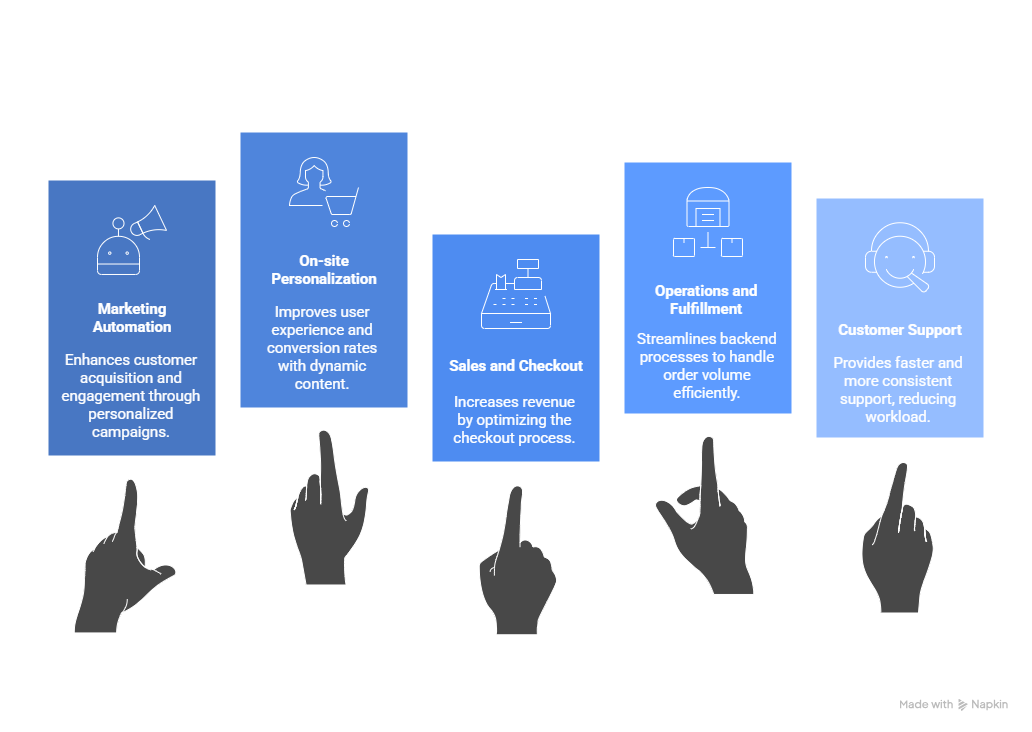
Automation typically spans the full store operation:
- Marketing: Cart recovery, post-purchase flows, product recommendations.
- On-site experience: Personalized content, local currency display, region-specific messaging.
- Sales and checkout: Automated discounts, payment logic, checkout recovery.
- Operations: Inventory syncing, order routing, stock alerts.
- Customer support: Ticket routing, automated replies, review requests.
- Analytics: Scheduled reports, performance alerts, anomaly detection.
As stores grow, manual processes quickly become bottlenecks. E-commerce automation removes those bottlenecks by letting systems handle repeatable work, so teams can focus on optimization, growth, and customer experience.
Tip: If you’re selling across multiple countries, this guide breaks down how geo-targeting helps keep pricing, content, and customer experience aligned as you scale.
Why ecommerce automation matters for growth
Growth in e-commerce is rarely blocked by ideas; it’s blocked by execution. As traffic, orders, and regions increase, manual processes start to slow everything down and small mistakes become expensive.
Ecommerce automation helps teams scale without complexity or headcount, gives more consistency across systems, and keeps the customer experience stable as volume grows.
Automation supports growth in three key ways:
Speed and responsiveness
Automation removes delays from everyday operations. Campaigns launch faster, orders move through fulfillment without waiting, and customers get timely updates without manual follow-ups.
That speed matters. Faster responses mean fewer abandoned carts, fewer support tickets, and less revenue lost to hesitation or confusion.
Consistency at scale
Manual operations crack under pressure. Automation applies the same rules every time, whether you process 50 orders a day or 5,000.
This consistency reduces errors across…
- Pricing and promotions
- Inventory updates
- Fulfilment routing
- Customer communication
The result is a more predictable operation and a more reliable customer experience.
Control over international growth
Selling across regions adds complexity fast. Different currencies, shipping expectations, compliance rules, and messaging all need to stay aligned.
Automation makes this much more manageable. Location-aware workflows can adapt content, pricing, and journeys automatically, without maintaining separate stores or relying on manual updates.
That flexibility lets teams expand into new markets without rebuilding their entire setup.
Automation is a growth enabler, not just a cost saver
While automation does reduce manual work, its real value shows up in performance:
- Higher conversion rates from more relevant experiences
- Better retention through timely follow-ups and personalised journeys
- Lower operational drag as order volume increases
Instead of reacting to growth problems after they appear, automation lets teams build systems that support growth from the start.
As e-commerce operations mature, automation shifts from saving time to driving revenue. The next step is understanding how automation evolves as businesses scale and what to focus on at each stage.
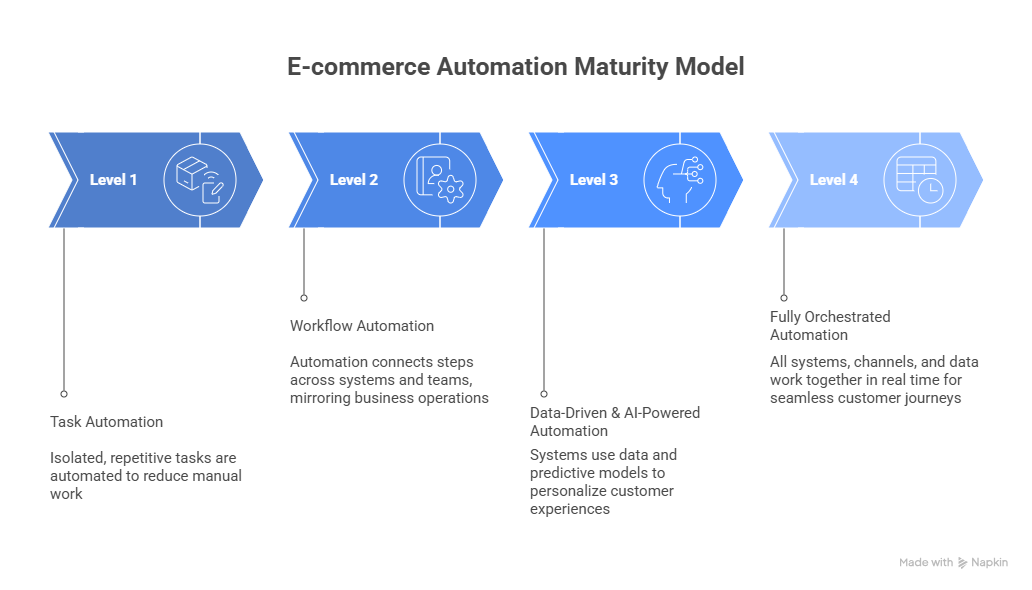
The ecommerce automation maturity model
Ecommerce automation is not something you implement in one step. Most teams build gradually, starting with simple tasks and moving toward connected, end-to-end workflows.
Knowing where your business sits on this maturity model makes it easier to decide what to automate next. It helps you avoid overbuilding too early, wasting time on low-impact automations, or adding tools that do not work well together.
The model below outlines four stages of e-commerce automation. Each stage builds on the previous one and reflects how automation typically evolves as stores grow.
Level 1: Task automation
At this stage, automation is focused on isolated, repetitive tasks. These are usually the first pain points teams try to solve.
Common examples include:
- Sending order confirmation emails
- Tagging customers in your CRM after a purchase
- Auto-generating shipping labels when an order is placed
Level 1 is about reducing manual work, but the impact is mostly operational more than it is strategic. You’re saving time here, not driving revenue growth yet.
Level 2: Workflow automation
At this stage, automation moves beyond single tasks and starts connecting steps across systems and teams. Instead of triggering one action, workflows coordinate what happens next based on who the customer is and what they’ve done.
A single event can trigger multiple outcomes:
- A returning or high-value customer is flagged in your CRM
- Follow-up messaging is adjusted automatically
- Internal teams are notified to take action
Automation at this level begins to mirror how the business actually operates. Rules are shaped around customer segments, lifecycle stages, and internal priorities rather than isolated events.
Level 3: Data-driven and AI-powered automation
At this point, automation becomes smarter. Instead of relying only on fixed rules, systems use data and predictive models to decide what to do.
Examples include:
- Dynamic product recommendations based on browsing behavior and purchase history
- Automated email sequences triggered by churn risk scores
- Real-time pricing adjustments based on inventory and demand
This level often involves machine learning models, customer data platforms (CDPs), or AI-powered tools.
Level 4: Fully orchestrated e-commerce automation
This is the end goal: all systems, channels, and data working together in real time. Automation isn’t just reactive or predictive, it’s coordinated across the entire customer journey.
Picture this:
- A customer browses a product in New York
- Your site shows local pricing and shipping options with Geo Targetly
- They abandon their cart
- Your system triggers a location-aware retargeting ad and personalized SMS
- When they return, they see a tailored homepage with relevant offers
Platforms that support this level often combine APIs, visual builders, and real-time data pipelines.
Knowing your current level helps you avoid overengineering too early or underinvesting when you're ready to scale. As you move up the maturity model, the impact of automation shifts from saving time to driving revenue.
What you can automate in e-commerce (by function)
E-commerce automation works best when it is applied by function. Instead of trying to automate everything at once, teams usually start by addressing the areas that slow growth or create the most manual work.
Marketing and customer acquisition automation
Marketing automation helps teams run consistent, timely campaigns without constant manual input.
Common automation areas include:
- Behavior-based email and SMS flows such as cart abandonment, post-purchase follow-ups, and re-engagement.
- Audience segmentation based on behaviour, lifecycle stage, or location.
- Campaign triggers tied to site activity, purchases, or engagement.
- Lead capture and routing from popups or forms into the right lists or workflows.
On-site personalization and conversion automation
On-site automation focuses on adapting the shopping experience in real time to give a smoother experience and increase conversions.
This often includes:
- Location-aware content such as shipping messages, promotions, or compliance notices.
- Dynamic banners, CTAs, or content blocks based on visitor context.
- Automated product recommendations driven by behaviour.
- Exit-intent and engagement triggers that respond to how users interact with the site.
Sales and checkout automation
Checkout is one of the highest-impact areas for automation. Small improvements here can significantly affect revenue.
Automation commonly supports:
- Abandoned checkout recovery through timed follow-ups.
- Automated discount logic for specific conditions or customer segments.
- Upsell and cross-sell prompts tied to cart contents or purchase history.
- Payment and checkout logic that adapts to the visitor’s context.
Operations and fulfilment automation
Behind the scenes, automation keeps order volume from overwhelming operations teams.
Typical use cases include:
- Inventory synchronization across sales channels.
- Order routing based on availability, location, or fulfilment rules.
- Shipping label generation and tracking updates.
- Low-stock alerts and automated reordering.
Customer support automation
Support automation focuses on speed, consistency, and reducing repetitive work.
This often covers:
- Automated responses to common questions.
- Ticket tagging and routing based on topic or order data.
- Self-service flows for returns, exchanges, or order status.
- Review and feedback requests after resolution.
Ecommerce automation powered by geo-targeting
Geo-targeting automations solve a different problem: how the storefront and customer journey adapt based on where a visitor is located.
That matters because location affects far more than the display language. It shapes pricing expectations, delivery confidence, payment preferences, and even whether a shopper trusts what they see.
Tip: Check out our guide on how to build a multilingual site to learn the best ways of creating a website that suits a global audience.
Why location-based automation matters in e-commerce
E-commerce is global by default, but customer expectations are not. Shoppers from different regions expect:
- Prices in their local currency
- Clear delivery timelines
- Familiar legal and consent messaging
- Offers that make sense for where they are
Handling this manually doesn’t scale well. Separate country sites, duplicated pages, and constant content updates quickly become hard to maintain.
Location-based automation removes that overhead. Instead of managing multiple versions of the same experience, rules apply automatically based on the visitor’s location.
How Geo Targetly fits into e-commerce automation
Geo Targetly is a suite of geo-targeting and personalization tools designed for e-commerce businesses that need their site to adapt by location.
Instead of building separate regional stores or managing endless manual rules, Geo Targetly lets you control how content, pricing, links, and user journeys change based on where a visitor is browsing from.
Everything runs through a single script and dashboard, layered on top of your existing e-commerce platform and marketing stack.
Once it’s in place, location-based changes happen automatically. Teams can adjust messaging, routes, and experiences by country, region, or city without rebuilding pages or constantly pushing updates.
Take a look at how Geo Targetly’s different tools work to see if it’s right for you:
Geo Redirect
Geo Redirect handles the first problem international stores usually run into: visitors landing on the wrong version of the site.
Instead of showing everyone the same homepage and hoping they find the right store, Geo Redirect sends people to the most relevant country or regional page as soon as they arrive. That keeps pricing, shipping details, and promotions aligned from the start.
Teams use it to manage international storefronts, regional pricing pages, and market-specific campaigns without juggling multiple sites or manual redirects.
Geo Content
Geo Content is all about changing what people see without duplicating pages.
It can swap banners, messages, and content blocks based on location, so the same page can show different information depending on where someone is browsing from.
That’s especially useful for shipping notices, regional offers, legal messages, and delivery expectations.
The benefit isn’t just personalization, it’s keeping everything in sync without maintaining separate versions of the same page.
Geo Currency
Unclear pricing is one of the most common sources of hesitation in international shopping. Geo Currency was created to address that problem head on.
Prices are displayed automatically in the visitor’s local currency, so shoppers don’t have to do mental conversions or wonder what they’ll actually be charged at checkout.
This level of clarity helps people move forward with more confidence and reduces unnecessary drop-off during browsing and checkout.
Geo Links
Geo Links helps keep international traffic landing on the right local pages.
Instead of managing separate links for each market, Geo Links route visitors from ads, emails, or campaigns to the right local page automatically. Messaging stays consistent from click to landing page, even when campaigns run across multiple regions.
This makes international campaigns both easier to manage and far less fragile.
Geo Consent
For GDPR and other laws, Geo Consent handles consent and privacy rules by location, without relying on manual setup.
Different regions require different consent experiences, and managing those rules manually is risky and time-consuming. Geo Consent shows the correct consent banner based on where the visitor is browsing from, keeping compliance aligned with local requirements while maintaining a clean user experience.
Geo JavaScript
For teams that need more control, there’s Geo JavaScript.
It gives developers a way to react to location in real time. Location data can be used to influence what runs, what loads, or what gets tracked, depending on how the rest of the stack is set up.
This keeps location logic close to the systems that already exist, instead of adding another layer of rules to manage.
Where geo targeting adds the most value
Geo-targeting doesn’t need to sit off to the side; it fits into the same automation workflows teams already use across marketing, checkout, and post-purchase flows. Location simply becomes another input, alongside behavior and lifecycle stage.
Used this way, location helps teams show clearer pricing, more relevant messaging, and fewer mismatches without adding more systems to manage.
If you want to add location awareness to your existing e-commerce setup, use Geo Targetly to personalize content, pricing, and journeys by location without rebuilding your store.
AI and the future of ecommerce automation
AI is changing how ecommerce automation works, but not in the “replace everything” way it’s often presented. In practice, AI is most useful when it supports decision-making and personalization, not when it runs unchecked.
Right now, AI is helping automation move from fixed rules to more adaptive systems.
Where AI adds real value
AI works best in areas where patterns matter more than perfect rules.
That includes…
- Predicting intent, such as identifying visitors who are likely to abandon or convert
- Improving recommendations based on browsing and purchase behaviour
- Adjusting timing and messaging based on engagement patterns
- Supporting inventory planning and demand forecasting
Instead of relying only on static triggers, AI helps automation respond to what customers are likely to do next.
AI works better with context
AI is far more effective when it has strong signals to work with. Location is one of the most important ones.
Where a visitor is browsing from influences:
- Pricing expectations
- Delivery confidence
- Payment preferences
- Legal and consent requirements
When AI-driven personalisation is paired with location-based automation, experiences become more relevant without adding complexity. Behaviour explains intent. Location explains context. Together, they produce better outcomes.
Where human oversight still matters
AI is not a set-and-forget solution.
Teams still need to:
- Define offer and pricing strategy
- Review customer-facing content
- Manage compliance and consent logic
- Handle edge cases in fulfilment and support
AI is most useful when it helps automation make better decisions, not when it runs everything on its own. As tools mature, strong results tend to come from combining predictions with solid data and clear guardrails.
Ecommerce automation tools landscape
Most ecommerce automation setups rely on a stack of tools rather than a single platform. Each tool plays a specific role, and the challenge is choosing tools that work well together instead of creating more complexity.
Rather than thinking in terms of “best tools,” it helps to think in terms of automation roles.
Marketing and lifecycle automation tools
These tools handle customer communication across email, SMS, and sometimes push notifications. They are usually the first automation layer e-commerce teams adopt.
They are commonly used for the following:
- Cart and checkout recovery
- Post-purchase and re-engagement flows
- Lifecycle and behavior-based segmentation
Popular options in this category include platforms like Klaviyo and Omnisend. The right choice depends less on features and more on how deeply the tool integrates with your store and analytics.
Workflow and integration tools
Workflow tools connect systems that do not natively talk to each other. They sit behind the scenes and move data between ecommerce platforms, fulfillment providers, support tools, and internal systems.
These tools are useful here:
- Data needs to move across multiple platforms
- Manual handoffs slow down operations
- internal processes are clearly defined
Examples include tools like Zapier or Make. They’re powerful, but they add complexity, so they work best once workflows are stable.
On-site personalisation and geo targeting tools
This category focuses on the customer-facing experience while visitors browse and shop.
These tools are used for several purposes:
- Adapt content and messaging dynamically
- Handle location-based redirects and pricing
- Manage regional compliance and consent requirements
This is where tools like Geo Targetly fit in. Instead of replacing your e-commerce platform, they add a personalization layer that automates localization without duplicating sites or managing multiple storefronts.
Customer support automation tools
Support automation tools help teams respond faster and more consistently as order volume grows.
They typically support the following:
- Automated replies to common questions
- Ticket tagging and routing
- Access to order context inside support conversations
Tools like Gorgias and Zendesk integrate directly with e-commerce platforms, so agents can see order history and customer context without switching systems.
Operations and fulfilment automation tools
These tools keep inventory, shipping, and order routing under control as volume increases.
They are commonly used for:
- Syncing inventory across sales channels
- Routing orders to fulfilment centres
- Generating shipping labels and tracking updates
Platforms like ShipStation and ShipBob automate these steps and reduce manual handling.
Analytics and optimization tools
Automation only works if you can measure its impact. Analytics tools automate reporting and surface performance issues quickly.
They support:
- Funnel and conversion tracking
- Performance alerts
- Visibility into which automations are driving results
Aside from Google Analytics 4, tools like Triple Whale help teams monitor performance across channels and regions.
How to choose the right tools
Most e-commerce teams do not need more software. They need fewer manual steps.
When evaluating tools, focus on:
- Which processes consume the most time
- Where errors happen most often
- How well tools share data
- whether automation improves the customer experience, not just internal efficiency
The strongest automation stacks grow deliberately. Tools are added to solve specific problems, not to tick feature boxes.
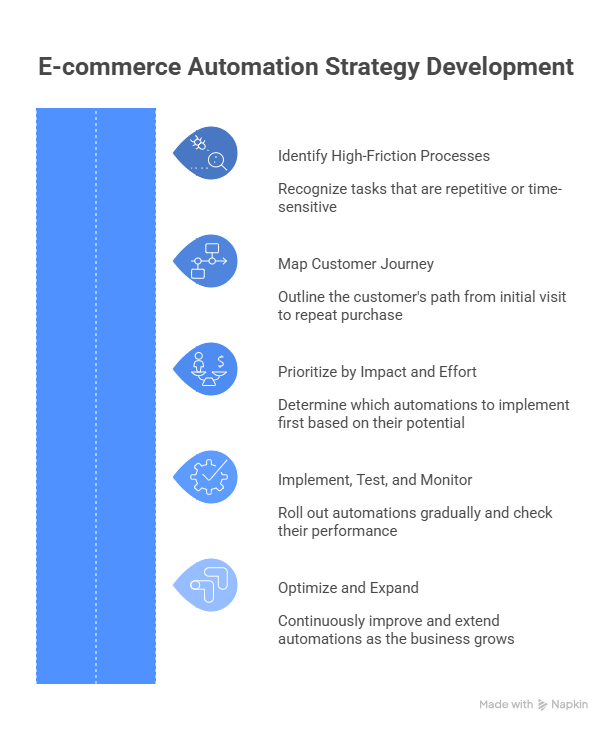
How to build an ecommerce automation strategy (step-by-step)
Ecommerce automation works best when it’s intentional. Dropping tools into your stack without a plan usually creates more work, not less. A simple strategy helps you focus on the automations that actually move the needle.
Step 1: Identify high-friction manual processes
Start with what’s slowing your team down today. Look for tasks that are repetitive, time-sensitive, or easy to get wrong.
Good candidates for automation:
- Manual tagging or segmentation
- Repetitive customer emails or follow-ups
- Inventory updates across channels
- Order handoffs between systems
- Basic support requests and status checks
If a task follows clear rules and happens often, it’s worth automating.
Step 2: Map the customer journey
Next, zoom out and look at the full customer journey, from first visit to repeat purchase. This helps you see where automation can smooth out the experience without making it feel automated.
Break the journey into stages:
- Discovery and acquisition
- Browsing and product research
- Cart and checkout
- Post-purchase communication
- Retention and re-engagement
At each stage, ask where automation could improve speed, relevance, or clarity.
Step 3: Prioritize by impact and effort
Not every automation is worth doing right away. Some are high impact but complex. Others are easy wins.
A simple way to decide:
- Start with automations that are high impact and low effort
- Queue complex or experimental automations for later
Early wins build confidence and free up time to tackle more advanced workflows later.
Step 4: Implement, test, and monitor
Roll automations out gradually and avoid launching everything at once.
As you implement:
- Test each workflow in isolation
- Check edge cases and failure scenarios
- Monitor performance closely in the first weeks
Automation should make things more predictable. If something breaks quietly in the background, it defeats the purpose.
Step 5: Optimize and expand over time
Automation isn’t a one-off project. As your store grows, new bottlenecks appear.
Revisit your automations regularly:
- Remove workflows that no longer add value
- Improve messaging or timing based on performance data
- Expand into new areas, such as deeper personalization or location-based logic
A strong automation strategy stays flexible. It evolves with your business instead of locking you into rigid processes.
Measuring ecommerce automation ROI
Ecommerce automation only works if you can show that it’s paying off. That doesn’t mean building complex attribution models, it means tying automation to outcomes you already care about and checking whether those numbers improve over time.
Start with one clear goal per automation
Before measuring ROI, be clear on what each automation is meant to improve. Trying to measure everything at once usually leads to noise.
Common goals include:
- Recovering more abandoned carts
- Increasing conversion rates during checkout
- Reducing manual work for ops or support teams
- Improving repeat purchases or retention
- Lowering error rates in fulfilment or inventory
Each automation should have a primary outcome. If it doesn’t, it’s probably not ready to be measured yet.
Track direct impact first
Some automations have a clear, measurable effect on revenue or conversions.
Examples of direct impact metrics:
- Revenue recovered from cart or checkout automation
- Conversion rate changes after introducing personalised or location-aware content
- Increases in average order value from automated upsells
- Lift in regional performance after localising pricing or messaging
Compare performance before and after automation is introduced, or use simple A/B tests where possible.
Don’t ignore indirect ROI
Not all value shows up immediately in revenue. Automation often pays off by cutting manual work and easing the load on teams.
Indirect ROI can show up in many ways:
- Fewer support tickets for basic questions
- Less time spent on manual updates or handoffs
- Fewer fulfilment errors or stock issues
- Faster campaign launches across regions
Tracking time saved and error reduction helps justify automation that supports growth behind the scenes.
Use simple comparisons, not perfect attribution
You don’t need perfect attribution to understand whether automation is working.
Helpful approaches include:
- Comparing automated vs non-automated flows
- Tracking regional performance before and after localisation
- Reviewing trends over time rather than single data points
If an automation consistently improves key metrics, that’s usually enough signal to keep it and expand on it.
Factor in cost realistically
Automation costs are more than just subscription fees. Setup time, maintenance, and internal effort all matter.
A simple way to think about ROI:
- Cost of the tool
- Time spent setting it up and maintaining it
- Measurable gains in revenue, time saved, or efficiency
Automation often shows results quickly when it’s applied directly to how customers browse and check out.
Review and refine regularly
As your store grows, the impact of automation changes.
Revisit performance regularly:
- Remove or simplify automations that aren’t pulling their weight
- Expand workflows that consistently improve results
- Test variations in timing, messaging, or logic
The goal isn’t to automate more, it’s to automate better.
Common ecommerce automation mistakes to avoid
Automation can make e-commerce easier to run, but only if it’s applied with some intention. These are the mistakes that tend to cause the most trouble.
Automating without a clear purpose
Automating tasks just because a tool supports them usually leads to noise. If you can’t clearly explain what an automation is meant to improve, it’s unlikely to deliver real value.
Start with a specific goal and build the automation around that.
Over-automating the customer experience
Not every interaction should feel automated. Too many triggered messages, popups, or rigid flows can make the experience feel impersonal or overwhelming.
Automation should handle repeatable work, not replace judgment or empathy.
Ignoring data quality
Automation is only as good as the data behind it. Poor segmentation, outdated customer data, or missing context can lead to irrelevant messaging and broken workflows.
Clean inputs matter more than complex logic.
Failing to test and review automations
Automations aren’t “set and forget.” Small issues can quietly hurt conversions or create confusion if they go unnoticed.
Review performance regularly and test changes before rolling them out broadly.
Treating localisation as an afterthought
Automation that ignores location often breaks down at scale. Pricing, messaging, and consent rules that work in one region may not work in another.
Location-aware automation helps prevent these issues without adding manual work.
E-commerce automation trends to watch
E-commerce automation is becoming less about isolated workflows and more about real-time, connected experiences. These are the trends that are actually shaping how teams automate today.
More real-time, behaviour-driven automation
Automation is moving away from fixed schedules and toward real-time triggers. Messaging, on-site content, and offers increasingly respond to what users are doing right now, not hours later.
This shift improves relevance and reduces missed conversion opportunities.
Location-aware personalisation becoming standard
As international selling becomes the norm, location-based automation is no longer optional. Pricing, shipping expectations, consent requirements, and messaging are increasingly handled automatically based on where visitors are browsing from.
Tools that add location context without duplicating sites are becoming core parts of modern stacks.
Automation closer to the storefront
Automation used to live mostly in email and ops. Now it’s happening directly on the site, shaping what users see as they browse.
That includes dynamic content, local currency display, region-specific offers, and personalised journeys that adapt instantly.
AI used to support decisions, not replace them
AI is settling into a supporting role rather than running everything. Teams are using it to spot patterns, predict intent, and optimize timing, while keeping strategy and customer experience decisions human-led.
The focus is shifting from “AI-powered” features to reliable outcomes.
Leaner, better-integrated stacks
Instead of piling on tools, more teams are simplifying. The trend is toward fewer platforms that integrate well, share data cleanly, and support automation without adding operational drag.
Automation works best when systems cooperate, not compete.
Conclusion
Ecommerce automation works best when it solves real problems, not when it tries to do everything at once. The goal is to take manual work out of the process while keeping the customer experience consistent as your store grows.
Most teams get the best results by starting small, automating the workflows that slow them down most, and building from there. As soon as multiple regions, currencies, or markets are involved, location-aware automation becomes especially valuable.
If you want to add location awareness to your automation setup, Geo Targetly lets you personalise content, pricing, and journeys by location without rebuilding your store.
FAQ
What is ecommerce automation?
Ecommerce automation is the use of software to run repeatable tasks and workflows across an online store without manual effort. It connects triggers, rules, and actions so systems respond automatically to customer behavior, orders, and operational events.
What are the best e-commerce automation tools?
There isn’t a single “best” tool. Most stores use a combination of tools that cover marketing automation, workflow integration, on-site personalisation, fulfilment, and analytics. The right tools depend on where manual work slows you down and how well platforms integrate with your existing stack.
How much does e-commerce automation cost?
Costs vary widely. Some automations can be set up using tools you already have, while others require paid platforms or development time. The real cost isn’t just subscriptions, but setup, maintenance, and internal effort. Automation usually pays off fastest when it simplifies checkout steps or replaces repetitive manual work.
Can small e-commerce businesses use automation?
Yes. Small stores often benefit the most from automation because it helps them do more with limited resources. Starting with basic flows like cart recovery, order confirmations, and simple on-site personalisation can deliver quick wins without heavy investment.
How does geo-targeting improve e-commerce automation?
Geo-targeting adds location context to automation. It allows stores to automatically adapt pricing, messaging, content, and consent rules based on where visitors are browsing from. This helps international shoppers understand pricing and messaging while allowing automation to scale across regions without manual localization.

Copywriter