


.webp)










Most shoppers won’t convert if they can’t clearly understand your store. Effective e-commerce translation covers the full buying journey and adapts language, UX, and expectations by market. With the right workflows and localization strategy in place, brands can scale globally without sacrificing performance, trust, or SEO.
Key takeaways:
- E-commerce stores need full-funnel translation, not just product pages
- Scalable workflows reduce maintenance across large catalogs
- Localization and multilingual SEO shape trust, compliance, and discoverability in each market
Expanding into new markets is one of the fastest ways to grow an e-commerce brand. It also exposes a hard limit. Most shoppers will not buy from a store they cannot fully understand.
Even when demand exists, unclear product descriptions, partially translated checkout steps, or missing local policies create friction long before a purchase decision is made.
At scale, manual translation breaks down quickly. When quality slips, trust, search visibility, and revenue slip with it.
Why ecommerce translation matters for growth
Global e-commerce continues to expand, and cross-border shopping is no longer limited to large brands. Language plays a direct role in whether that growth turns into revenue.
A large international study by CSA Research found that more than 70% of consumers prefer websites in their native language, and roughly 40% avoid buying when a site is English only.
That preference shows up in several ways:
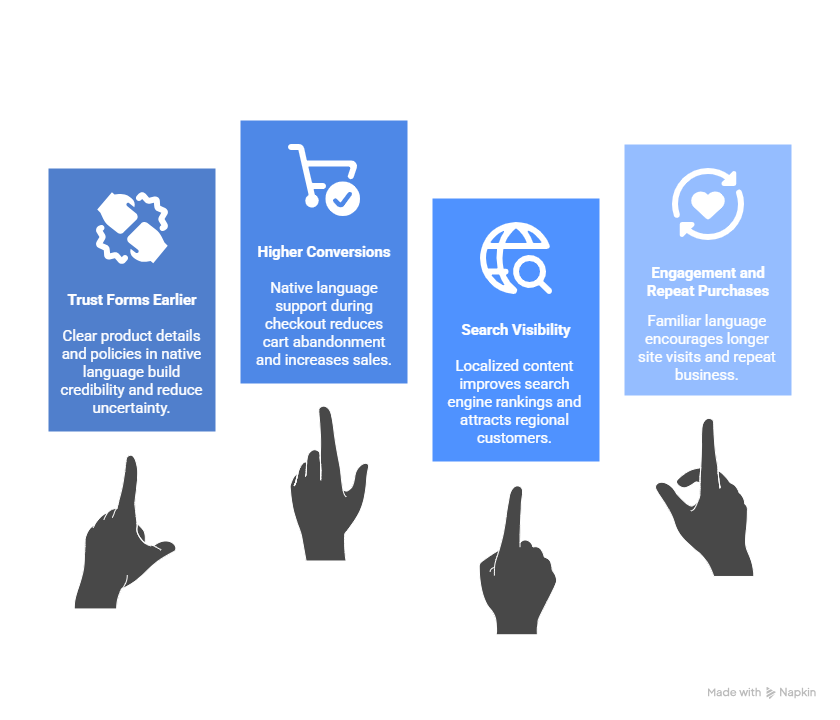
Trust forms earlier
Shoppers rely on language to judge credibility. Clear product details, readable sizing information, and understandable shipping and return policies reduce uncertainty.
When information feels incomplete or unfamiliar, hesitation increases.
Higher conversions
Product evaluation and checkout are sensitive stages. Any mismatch in language during these steps increases drop-off.
With global cart abandonment rates hovering around 70%, even small points of confusion have measurable impact.
Search visibility depends on language alignment
Search engines match content to local queries, not just intent. Product pages, category names, and metadata written in the shopper’s language are eligible to rank where English-only pages are not.
Translation directly affects whether your store appears in regional search results at all.
Engagement and repeat purchases increase
Visitors spend more time on sites that feel readable and familiar. They browse more pages, understand offers more clearly, and are more likely to return after a first purchase.
Translation supports expansion, localization sustains it
Translation focuses on language accuracy, and localization adapts the surrounding experience, including currency, payment options, delivery expectations, tone, and regional norms. Together, they determine whether a store feels local or foreign.
When both are handled well, translation stops being a barrier and becomes a growth lever.
What needs to be translated in an e-commerce store
A multilingual store works best when every customer-facing touchpoint matches the shopper’s language. Gaps in translation often create confusion, hesitation, or inconsistent expectations.
This checklist covers the areas that matter most and why each one affects the overall experience.
Note: Partial translation is often worse than no translation at all. When only the “main” content appears in another language, users quickly notice untranslated UI, English-only policy text, or unclear checkout fields. Inconsistencies break trust and lead to higher drop-off.
Translation vs. localization: What e-commerce brands must know
Translation and localization often get grouped together, but they solve different problems. When you’re expanding into multiple regions, the distinction affects messaging clarity, conversions, and compliance.
Translation covers the words
Translation focuses on converting text from one language to another while preserving meaning. It works well for straightforward content such as product specs, ingredient lists, and help articles. When the goal is clarity, translation is enough.
Localization adapts the entire experience
Localization adjusts everything around the text so the experience feels natural to each audience.
This usually includes:
- Payment methods
- Currency and measurements
- Tone and formality
- Visual context
A product page translated into French still feels foreign if the pricing stays in USD or if the model’s sizing chart is only in inches.
Compliance adds another layer
Once you sell across borders, legal and regulatory text must match local rules. Returns, warranties, order cancellations, tax displays, and privacy notices all change based on the region.
Even perfect translations won’t help if policy language doesn’t align, and the risk shifts to fines, complaints, or chargebacks.
Choosing a translation strategy: Human, machine, hybrid
Your translation approach depends on the scale of your catalog, how often content changes, and how much nuance your brand voice requires.
Most e-commerce teams use more than one method. Here’s where each option makes sense and where it falls short.
Machine translation
Machine translation (MT) uses automated systems like Google Translate, DeepL, or Amazon Translate to convert text between languages. It’s fast, scalable, and low-cost; ideal for high-volume or frequently updated content.
Tip: If you’re interested in going this route, take a peek at our guide to the best machine translation technology to get a breakdown of the best options available.
Human translation
Human translators bring context, cultural nuance, and brand sensitivity that machines can’t match. However, it’s slower and more expensive, but often necessary for high-impact content.
If you're only translating a few high-value pages per region, human translation is likely the right call. Use it where tone, clarity, and trust matter most.
Hybrid workflows
Hybrid workflows combine the scale of machine translation with the quality of human review. Typically, MT handles the first pass, and a native speaker or professional translator edits for accuracy and tone.
When data to text generation is useful
If you’re working with structured data like pricing, specs, or availability, data-to-text generation can automate translation entirely. This method pulls from a database and assembles sentences using pre-approved templates and localized variables.
The overarching goal is not to pick one approach, but to match the method to the type of content. When you pair the right workflow with the right content, your translations stay consistent, efficient, and aligned with how each market expects to shop.
Translation projects become difficult to manage once multiple languages, teams, and updates are involved. A simple workflow keeps everything organized and makes it easier to expand into new markets without rebuilding the process each time.
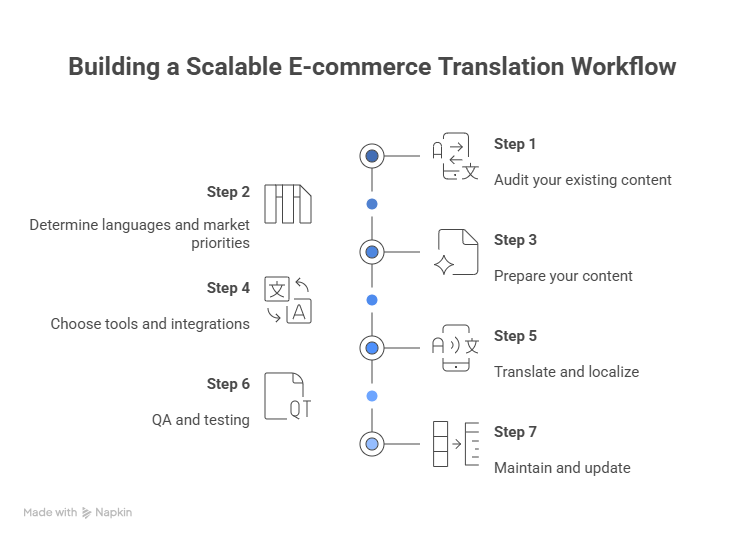
Building a scalable e-commerce translation workflow
Translation projects become difficult to manage once multiple languages, teams, and updates are involved. A simple workflow keeps everything organized and makes it easier to expand into new markets without rebuilding the process each time.
Step 1: Audit your existing content
Start by mapping what content exists and where it lives.
Use a content inventory or CMS export to identify what changes frequently, such as pricing or promotions, versus what stays relatively static, like product specs.
Step 2: Determine languages and market priorities
Avoid translating everything into every language. Focus on markets with the strongest opportunity first.
Use data from Google Analytics, Shopify, or your CRM to see where international traffic comes from, then weigh revenue potential and operational readiness. Also factor in local competition, shipping capabilities, and customer support coverage. Translation without operational support creates friction instead of growth.
Step 3: Prepare your content
Clean source content before translation. Consistent, structured copy translates more accurately and costs less to maintain.
Unclear phrasing, slang, or inconsistent product descriptions increase translation effort and reduce quality. Structured content also works better with translation memory tools over time.
Step 4: Choose tools and integrations
Manual translation workflows do not scale.
Look for tools that integrate with your e-commerce and content stack, such as:
- Translation management systems
- CMS plugins or APIs for Shopify, Magento, or headless setups
- Geo-personalization tools for serving localized content by region
Step 5: Translate and localize
Translation handles language. Localization adapts the experience.
That includes converting currencies and units, adjusting date formats and payment options, and aligning tone or imagery with regional expectations.
Step 6: QA and testing
Test each localized version the same way you would test a new release.
Check for layout issues caused by longer text, currency or shipping mismatches, and incorrect language detection or redirects.
Step 7: Maintain and update
Translation is ongoing. Set up a process to keep all language versions aligned as content changes.
Track updates with version control, schedule refreshes for promotional content, and keep translation memory up to date. If you use a TMS, automate alerts when new or updated content needs translation.
E-commerce SEO best practices for multilingual stores
Expanding your e-commerce store into new languages opens the door to global markets, but it also adds complexity to your SEO strategy.
Multilingual SEO helps you rank in local search results, avoid cannibalizing your own pages, and deliver a better experience to international visitors.
URL structure
Language and region should be clear from the URL. The three common approaches are:
- Subdirectories: example.com/fr/
- Subdomains: fr.example.com
- Country-code top-level domains: example.fr
For most e-commerce teams, subdirectories offer the best balance. They keep domain authority centralized, simplify analytics, and are easier to manage at scale.
Hreflang implementation
Hreflang tells search engines which language or regional version of a page to show in search results.
Each page should reference:
- Its own language version
- All translated equivalents
- A default version when appropriate
Incorrect or missing hreflang can lead to the wrong pages ranking in the wrong regions or duplicate indexing across languages.
Tip: Check out our guide to using hreflang tags, and then head over to our free hreflang tag generator.
Metadata & alt text
Titles, meta descriptions, and image alt text need localization, not direct translation. These elements influence both rankings and click-through rates.
If product images are reused across languages, the alt text should reflect local terminology and search behavior on each version of the page.
Avoid duplicate content
Multilingual sites often trigger duplication issues when translated pages are structurally identical or auto-generated without review.
To reduce risk:
- Use hreflang consistently
- Localize headings and product descriptions
- Avoid bulk auto-translation without quality checks
Keyword localization
Direct translation of keywords rarely works. Instead, research how users in each region search for your products.
Use local keyword tools like Google’s Keyword Planner with regional settings, or platforms like Ahrefs and Mangools that support country-level data.
Internal linking across languages
Language switchers should link directly to equivalent pages, not send users back to a homepage.
From an SEO perspective:
- Use absolute URLs
- Keep internal linking consistent across language versions
- Make it easy for search engines to discover relationships between translated pages
Performance considerations
Multilingual sites grow quickly, which can affect load times if not handled carefully.
To keep performance tight:
- Serve only the necessary language assets per page
- Use a content delivery network (CDN) with global edge delivery
- Minify and lazy-load localized scripts or images
UX, cultural adaptation, and compliance requirements
Clear translation helps shoppers understand your store. Trust comes from everything else working the way they expect. Payment methods, delivery details, tone, and pricing all signal whether your store feels reliable or risky.
Areas that often need adjustment by region:
- Preferred payment methods
- Delivery timelines and tracking expectations
- Prices shown in local currency
- Imagery and visual context
- Tone and level of formality
- Familiar trust signals such as local payment icons or certifications
- Regional privacy, pricing, and returns rules
- Core accessibility standards
You don’t need a separate site for every market. Removing small issues often has more impact than adding new features.
Common e-commerce translation mistakes to avoid
Many ecommerce translation issues don’t come from bad intentions, but from small oversights that quietly hurt conversions, trust, or search visibility.
Relying solely on machine translation
Product descriptions, checkout instructions, and CTAs can end up sounding awkward or misleading.
What to do instead: Use professional translators for key pages like product listings, checkout flows, and support content.
Ignoring regional language differences
Spanish in Mexico isn’t the same as Spanish in Spain. The same goes for French in France vs. Canada. Local idioms, formal vs. informal tone, and even product terminology can vary.
What to do instead: Create region-specific versions of each language.
Leaving images and graphics untranslated
Banners, promo graphics, or product images with English text can confuse non-English speakers or make your site feel incomplete.
What to do instead: Localize images just like you do text. Use tools like Geo Image that support geo-personalized images or create region-specific versions.
Skipping currency and measurement conversions
Even if your text is translated, showing prices in the wrong currency or sizes in unfamiliar units can kill conversions.
What to do instead: Automatically convert currencies and measurements based on the visitor’s location. Geo Currency and Geo Content help you display local pricing and adapt size charts or shipping info without duplicating pages.
Translating SEO content without localization
Directly translating meta titles, descriptions, and keywords often leads to poor search visibility.
What to do instead: Do keyword research for each target language and market. Then localize your SEO content accordingly. You’ll improve organic traffic and reduce reliance on paid ads.
Using inconsistent tone or branding
A brand voice that’s playful in English might come off as unprofessional in Japanese. Inconsistency across languages can dilute your brand and confuse customers.
What to do instead: Build a tone and voice guide for each language and share it with your translators and marketing teams to keep messaging aligned across regions.
How to measure the impact of e-commerce translation
Translating your e-commerce site into multiple languages is a solid step toward global growth, but the real question is: does it move the needle?
To answer that, you need a clear framework for measuring the impact of translation on user behavior, conversion rates, and overall revenue.
Here’s how to track the real business value of e-commerce translation with precision:
Track pre- and post-translation performance by region
Start by benchmarking your key metrics before launching translated content; typically non-English-speaking markets where your traffic is already growing.
Measure:
- Bounce rate: High bounce rates from international visitors often signal a language mismatch.
- Time on site: If users stick around longer post-translation, that’s a strong signal of improved engagement.
- Conversion rate: Track how many visitors from translated regions complete purchases, sign up, or take other key actions.
Use tools like Google Analytics 4 or Mixpanel to segment users by country or language. and set up custom reports to compare performance before and after translation rollout.
Monitor language-specific conversion funnels
Generic funnel metrics don’t tell the full story. You need to break down your e-commerce funnel by language to isolate where translation is helping or where it’s falling short.
Use event tracking to map each step of the funnel by language. This helps pinpoint friction points that may need better translation or cultural adjustment.
A/B test translated vs. non-translated content
If you’re not sure whether translation is driving results, run controlled experiments. Show translated content to one group of users and the original version to another, keeping everything else constant.
Test:
- Product descriptions
- Landing pages
- Checkout flows
Track differences in click-through rates, add-to-cart actions, and completed purchases. Even small lifts in conversion can justify the cost of translation, especially at scale.
Analyze search behavior and SEO impact
Monitor organic search traffic by language and region to see if translated pages are ranking for local keywords.
Look at:
- Impressions and clicks in Google Search Console by country
- Keyword rankings for translated product or category pages
- Bounce rates from search traffic in localized markets
If your translated content isn’t discoverable, you may need to revisit metadata, hreflang tags, or keyword alignment with local search habits.
Gather qualitative feedback from localized users
Quantitative data tells you what’s happening. To understand why, collect direct feedback from users in translated regions.
Use:
- On-site surveys in local languages
- Post-purchase feedback forms
- Customer support tickets tagged by language
Patterns in feedback can highlight confusing translations, missing context, or cultural mismatches that hurt trust and conversions.
How Geo Targetly's Geo Translate helps deliver localized content
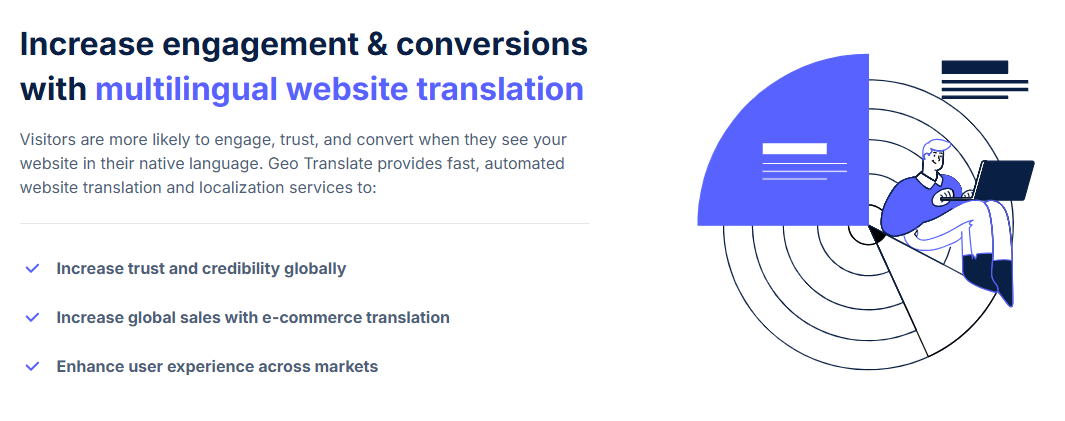
Delivering localized shopping experiences usually means juggling multiple sites, duplicated content, and fragile workflows. Geo Translate takes a different approach by letting teams manage localization from a single site while adapting what each visitor sees based on location.
Instead of redirecting users or maintaining separate domains, Geo Translate swaps content directly on the page. Language, images, UI labels, shipping information, and promotional messaging change automatically based on where the visitor is coming from.
That keeps the site structure simple and avoids the maintenance issues that come with multi-site setups.
Location-aware content without extra sites
Geo Translate detects a visitor’s country and serves the right version of your content immediately. Shoppers land on the same URL, but see language and regional details that match their expectations.
This works well for stores selling across multiple countries where consistency matters but local differences still affect conversion.
Region-level control, even within the same language
Shared languages still need regional nuance. Geo Translate allows teams to create country-specific variants within the same language, so wording, terminology, and tone stay relevant.
UK English, US English, and Australian English can each reflect local phrasing, pricing conventions, and delivery expectations without duplicating pages.
Platform-agnostic and marketer-friendly
Geo Translate works across Shopify, WooCommerce, Webflow, headless setups, and custom builds. Marketers can manage translations visually, while developers can use JavaScript or APIs when deeper control is needed.
That flexibility makes it easier to scale localization without slowing down product or marketing teams.
Built for performance at scale
Translations and content swaps run on a global edge network, so localized content loads quickly no matter where visitors are browsing from. Performance remains stable as the site expands into new regions.
Useful beyond language alone
Many teams use Geo Translate for more than translation. It supports region-aware adjustments across the shopping experience, including:
- Country-specific product messaging
- Region-based promotions and campaigns
- Shipping details that change by location
- Localized reviews and trust signals
- Seasonal content that varies by market
- Stock or availability differences between regions
If you want to localize your store without managing multiple sites or rebuilding your stack, Geo Translate gives you a practical way to adapt language and content from one place.
Try it on a few high-impact pages and measure the difference!
Emerging trends in ecommerce translation
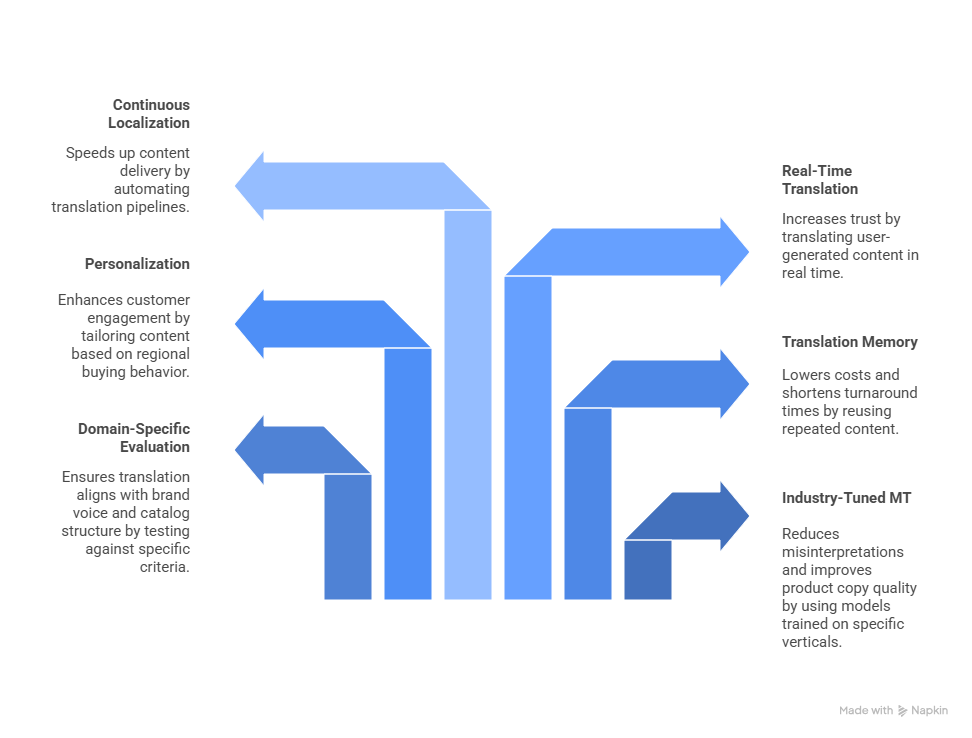
Ecommerce translation is shifting away from one-off projects and toward continuous, system-driven workflows. As catalogs grow and markets multiply, teams are prioritizing speed, consistency, and adaptability.
Industry-tuned machine translation
Generic machine translation is being replaced by models trained on specific verticals. Apparel, electronics, beauty, and home goods all use distinct terminology. Industry-tuned models reduce misinterpretations and produce cleaner product copy with less manual cleanup.
Domain-specific quality evaluation
Brands are no longer relying on generic accuracy scores. Translation output is being tested against brand voice, catalog structure, and conversion performance. Teams compare engines side by side and select the one that performs best for their product category rather than defaulting to a single provider.
Translation memory as an operational layer
Translation memory is becoming core infrastructure. Repeated product attributes, sizing details, and feature lists are reused across thousands of SKUs. That consistency lowers costs and shortens turnaround times, especially during seasonal launches or catalog updates.
Localization combined with personalization
Localization is no longer the finish line. Many teams now layer location-based personalization on top of translated content. Messaging, imagery, and calls to action shift based on regional buying behavior rather than language alone.
Real-time translation for user-generated content
Reviews and Q&A sections strongly influence buying decisions but are often left untranslated. New tools translate user-generated content in real time, making social proof readable across markets and increasing trust where the brand is still unfamiliar.
Continuous localization in headless commerce
Headless architectures support always-on localization. Instead of batch translation cycles, content moves through automated pipelines as it is created. New products, promotions, and support articles can reach international shoppers faster without manual coordination.
Conclusion
A multilingual e-commerce store works best when it solves real buying problems, not when it just “adds languages.” Clear copy, local pricing, and familiar expectations reduce hesitation and make it easier for customers to complete a purchase.
Brands that grow across borders usually approach translation as a system, not a one-time project. Ongoing updates, localized UX decisions, and strong SEO foundations help keep global catalogs manageable as the business scales.
If you want to localize your store without managing multiple domains or duplicating your CMS, Geo Translate offers a practical way to adapt language, imagery, and regional messaging from a single site. You can start small, test impact by market, and expand as your global strategy evolves.
Try Geo Translate to serve the right language and content to every visitor automatically, while keeping your store fast, consistent, and easy to maintain.
FAQ
What is the difference between e-commerce translation and e-commerce localization?
Translation converts text from one language to another. Localization adapts the entire shopping experience for a specific region. This can include currency, sizing, delivery expectations, legal copy, tone, imagery, and SEO choices.
How many languages should an online store translate into?
Start with the markets that already send traffic or show strong demand. Most brands begin with one or two high-opportunity languages and expand once the workflow is solid.
What parts of an e-commerce website need translation?
Translate all customer-facing content. This includes product pages, category pages, checkout flows, legal policies, support articles, email notifications, and SEO elements such as titles, descriptions, and alt text.
Does e-commerce translation improve SEO and search rankings?
Yes. Search engines match content to a user’s language and region. Localized keywords, metadata, and hreflang help you appear in country-specific search results and attract more qualified traffic.
What is the best way to translate large product catalogs?
Most teams use a mix of machine translation for scale and human review for accuracy. A translation memory or structured content system keeps terminology consistent.
Should I use machine translation or human translation for my store?
Machine translation is helpful for large, low-risk content. Human translation is better for pages that influence trust or brand perception. Many teams use a hybrid approach to balance cost and quality.
How do I maintain translations when product information changes?
Use a clear workflow that tracks source updates and flags content for retranslation. A translation management system or structured CMS helps keep all versions aligned.
What are the most common mistakes in ecommerce translation?
Teams often overlook metadata, sizing guides, region-specific terminology, legal copy, imagery with embedded text, and currency or measurement conversions. These gaps can break the experience for non-English visitors.
How do I implement hreflang correctly for a multilingual store?
Each page needs a self-referencing hreflang tag plus hreflang tags for every translated version. Use the correct ISO language and region codes and keep the structure consistent across the site.
How do I measure the impact of ecommerce translation?
Track conversion rate, bounce rate, time on site, cart abandonment, and organic traffic for each language. Compare performance before and after launching translated content, and monitor funnels by region.
How can translation help reduce cart abandonment?
Clear product information, localized payment options, translated return policies, and familiar shipping expectations help shoppers feel confident enough to complete a purchase. Poor or incomplete translations often create hesitation that leads to abandonment.

Copywriter